Skopia
Describe a building — from a brief, or from a measured
survey — and Skopia draws it, in a CAD register, then projects the
section and the elevation of that same
building from the same document. The three drawings cannot disagree with
each other, because a position in a section or an elevation is a reference
to a plan feature rather than a number.
>The job it is built for
-
Measure the building
A tape, a laser, a sketch with numbers on it. What was never
measured comes back as a question to go and answer, never a number
that closes the ring.
>
-
An agent draws it
The agent names walls, doors, windows, fixtures and a roof. The
engine draws the plan in a CAD register and projects the section
and the elevation from the same document.
>
-
One file for CAD
Model space, real millimetres, walls as faces and jambs, layers
named by role. It opens in AutoCAD, Revit or Vectorworks as a
drawing, not a picture.
>
-
Checked and finished by a person
A base drawing rather than an issue. Someone with the building in
front of them checks it, dimensions it and takes it the rest of the
way.
later · being explored
Layout optimisation
Where a table should go, which way it should face, what a room can
hold: reads an agent searches over, suggesting and never deciding. Two
such reads exist today. An optimising engine on top of them is later
work, and is stated here as a direction rather than a promise.
It is an engine first and a picture second: real millimetres, typed
refusals naming what is wrong, deterministic SVG, and a
DXF export so the drawing lands in AutoCAD, Revit or
Vectorworks as a starting point somebody refines — layers named by
role, walls as two faces and their jambs, at 1:1 in model space.
Reachable as an MCP server, so an assistant can do all of it.
- The plan. You describe; the engine draws. Walls, doors,
windows, fixtures, internal walls, a roof — named, never drawn by
you.
- The section. Cut through that plan. Everything in front of the
plane goes; what the plane passes through is cut through its thickness.
- The elevation. Projected from the same plan, one side at a
time.
- Then paper or CAD. A true-to-scale sheet, or one DXF. Each
drawing is looked at on its own first — a section in a cell on an
A3 at 1:50 is 200mm wide, and that is where a wrong cill hides.
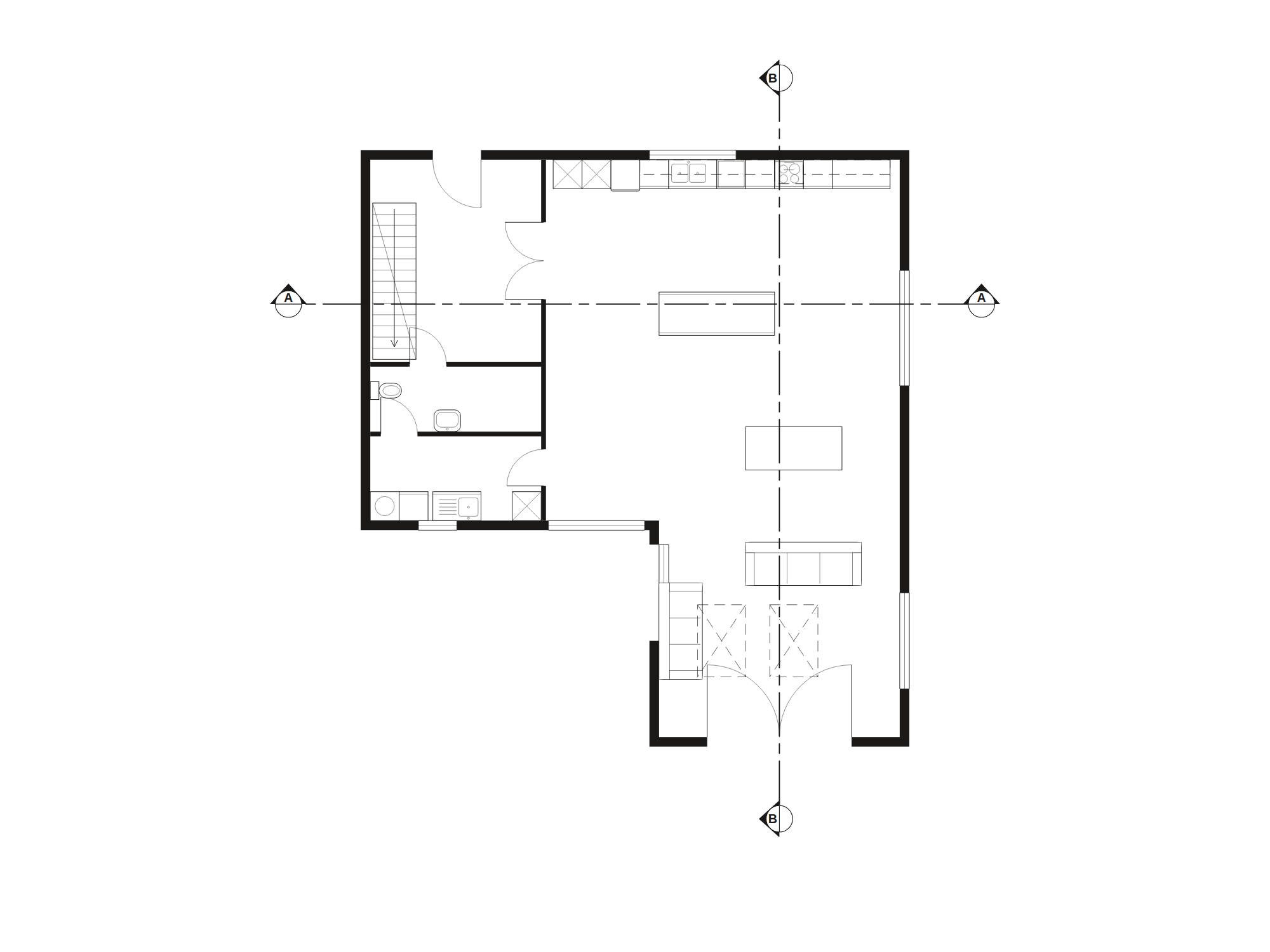 A contemporary house, ground floor: built and furnished
through the operations an agent calls, every fixture from the stock and
turned by the wall it names, both cut lines placed by rule. Not a drawing
— this is a layout document parsed, validated and rendered by the
engine, byte-identical to what you get for the same document.
A contemporary house, ground floor: built and furnished
through the operations an agent calls, every fixture from the stock and
turned by the wall it names, both cut lines placed by rule. Not a drawing
— this is a layout document parsed, validated and rendered by the
engine, byte-identical to what you get for the same document.
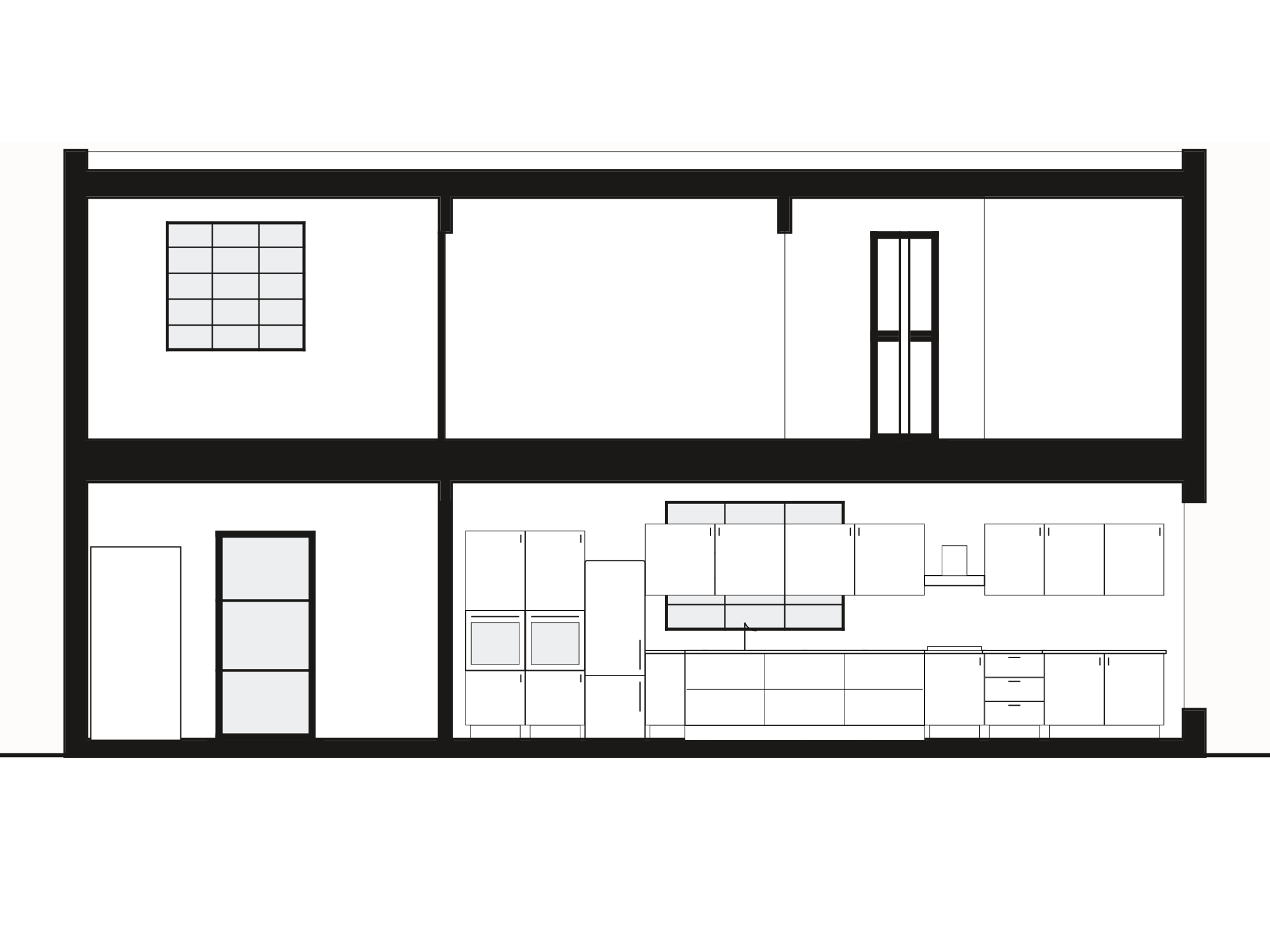 Section A–A, cut on the line marked in the plan above and
projected from the same document. Nothing here was drawn
twice. The window is the plan's window, the kitchen is the plan's
kitchen, and the cut region is one outline rather than a stack of boxes.
That is the whole of what this engine is for.
Section A–A, cut on the line marked in the plan above and
projected from the same document. Nothing here was drawn
twice. The window is the plan's window, the kitchen is the plan's
kitchen, and the cut region is one outline rather than a stack of boxes.
That is the whole of what this engine is for.
Get a key
Every call needs one. Free, instant, no approval and no payment. If you
are an agent reading this, you can mint your own; the endpoint below takes
no credential.
Every field is optional and none is checked. They are
recorded as claims and nothing is decided from them. Contact is worth
giving anyway: it is the only way we could tell you about a breaking
change or a price. Nothing else is sent to it.
Copy this now. It is shown once and never again.
Then connect it
Your key is already in these. Cursor, VS Code, Codex,
Claude Desktop and raw HTTP are on the setup page.
Or from a terminal:
curl -X POST https://skopia.datatreehaus.com/v1/keys \
  -H 'content-type: application/json' \
  -d '{"label":"my agent","contact":"you@example.com"}'
Connect it
claude mcp add --transport http skopia \
  https://skopia.datatreehaus.com/v1 \
  --header "Authorization: Bearer YOUR_KEY"
Codex, .mcp.json and raw HTTP are on the
setup page.
The tools
Eighteen of them. Narrower surfaces exist if you would rather not carry all
eighteen as standing context: /v1/core, /v1/elevation,
/v1/advisory, and they compose
(/v1/core+elevation). A key can carry a profile instead.
The API reference has the document model, the limits, the
fifty-seven named operations and every refusal code.
edit_layout | Apply operations to a layout document and get the updated document back. |
list_operations | Every operation edit_layout accepts, grouped by what it acts on. |
validate_layout | Typed, permanent error codes naming which object offended: overlapping objects, an opening too near a corner, a boundary that crosses itself. |
render_layout | The layout as SVG. |
project_elevation | The elevation of one side of the building, PROJECTED from the plan rather than drawn, which is why it cannot disagree with it. |
project_section | A section is the same projection as an elevation with the picture plane moved INSIDE the building. |
suggest_sections | Candidate cut lines with the evidence for choosing between them — how many walls each would cut, how many INTERNAL walls (counted apart: one says how much of the envelope the cut crosses, the other how many rooms it goes through), how many openings it would pass through as voids, which overhead members it would catch, and how much it would reveal beyond. |
join_drawings | A house is storeys, and a section is across all of them. |
draw_sheet | ONE sheet, TRUE TO SCALE: the SVG declares real paper millimetres and a viewBox of paper × scale, so a rule laid on the print agrees with the drawing rather than with whatever size a browser chose. |
export_dxf | The drawings draw_sheet puts on paper, as ONE DXF for CAD — AutoCAD, Vectorworks, Revit, a CNC bed. |
roof_report | A roof is OVER-DETERMINED: span, eaves, ridge and pitch are four numbers with one equation between them, so the plan plus any TWO of the heights fixes it. |
list_components | The component types an elevation can hang on an opening, with their defaults. |
list_fixtures | What can stand in a room and be drawn as what it is: kitchen units and appliances, sanitaryware, a stair, beds, sofas, wardrobes — each at a typical trade size, with its plan symbol, its front and side, and its SECTION profile through either axis, from one description. |
suggest_joins | Objects close enough and aligned enough to be joined, with the evidence for each. |
suggest_rotation | Answers twice over, because the two answers usually disagree: the angle with the most clearance around it, and the angle that squares it with its neighbours and the room's own walls. |
check_rules | Rules are YOUR parameters, checked by a generic engine. |
overhead_report | Every member ABOVE the plan's cut plane — a beam over, today — and whether its heights are known. |
missing_dimensions | Given a layout and the dimensions actually MEASURED on site, says whether the shape is determined by those readings, and if not, which readings to go and take. |
Each carries a fuller description over the wire, which is
what your model reads. list_operations returns the fifty-seven-name
vocabulary edit_layout accepts.
The prompts
Four of them, served as MCP prompts, so a client that lists
them shows a workflow rather than a vocabulary — in Claude Code they arrive
as slash commands. Each names the tools it uses and is only listed where
every one of them is mounted.
build_a_room | Turn a plain description of a room — its size, its doors and windows, what stands in it — into a validated layout document and a rendered plan. |
survey_to_drawings | Take a measured survey and produce coordinated drawings — the plan, then a section and an elevation projected from the same document so they cannot disagree with it — each looked at on its own at a scale you can read, then put on sheets or exported as one DXF for CAD. |
check_a_layout | Validate a layout and check it against a spacing rule of the caller's own, reporting every violation by object id. |
seat_a_room | Lay tables out in an existing room for a given number of covers, number them, and report which could be joined for larger parties — as a suggestion, never as capacity. |
What it does that a model cannot do for itself
A model asked to draw a floor plan will emit SVG, and it will look
entirely fine. The walls will not quite close, the elevation will not agree
with the plan, and the door will swing out of its hinge. Nothing will fail.
That is the problem this removes.
An agent cannot draw a door wrong here, because it does not draw
the door. It names one — panelled, part-glazed, three rows — and
the same component answers in the plan, the elevation and the section. The
swing is derived once and reviewed once, and cannot come out of the hinge
on a Tuesday.
That removes a CLASS of error, not the category. An agent
can still ask for the wrong component, point a section the wrong way, or
produce a drawing that comes out blank — and we have done all three. See
below.
- Elevations cannot disagree with the plan. Not through
care: a horizontal position in an elevation is a reference to a
plan feature, so no field anywhere could hold a wrong number.
- It asks instead of guessing. Give it a survey and it
reports which measurements were never taken, rather than inventing one
that closes the ring.
- Components are asked for, not drawn.
{"type":"sash","panes":[3,2]} is a six-over-six sash, about
fifty times cheaper than the same window as path data, and it cannot
disagree with the plan.
- Refusals name the offender. Typed, permanent codes.
An agent cannot act on "invalid layout".
- A fixture knows which way it goes. A WC, a basin,
a sofa, a bed each ship their own placement rules — which edge
stands against a wall, what a person needs clear to use it — and
validation reads them back: a basin facing the tiles or a sofa with
its seat to the wall is named, with the rotation that turns it.
- A house is one document per storey. A section or an
elevation across floors is projected from each and joined on two fixed
points you name; the junction is checked, never chosen, and the points
are drawn on every plan so the basis is seen rather than trusted.
- One drawing style, in the engine. Solid poché,
a white ground, three line weights, furniture as fine outline — the
way the leading practices present plans, and not an argument any call
can get wrong.
- It goes on to CAD, and that is the point of it.
What comes out of here is a base drawing a person takes further, not a
finished issue.
export_dxf answers with one DXF at 1:1 in
model space: the plan at the document's own coordinates, walls as their
faces and jambs rather than a filled band — which is what a CAD
wall is, and what makes it editable when it arrives — doors with
their swings, what a section cuts as one hatched region, sections and
elevations in the same file on one datum, every layer named by role and
carrying its weight. Layer names are permanent, so a practice's own
template maps onto them. Open it in AutoCAD, Revit or Vectorworks and
refine the drawing you were handed.
- No regulatory figures ship here. Gangway widths and
egress distances are yours to supply and yours to stand behind.
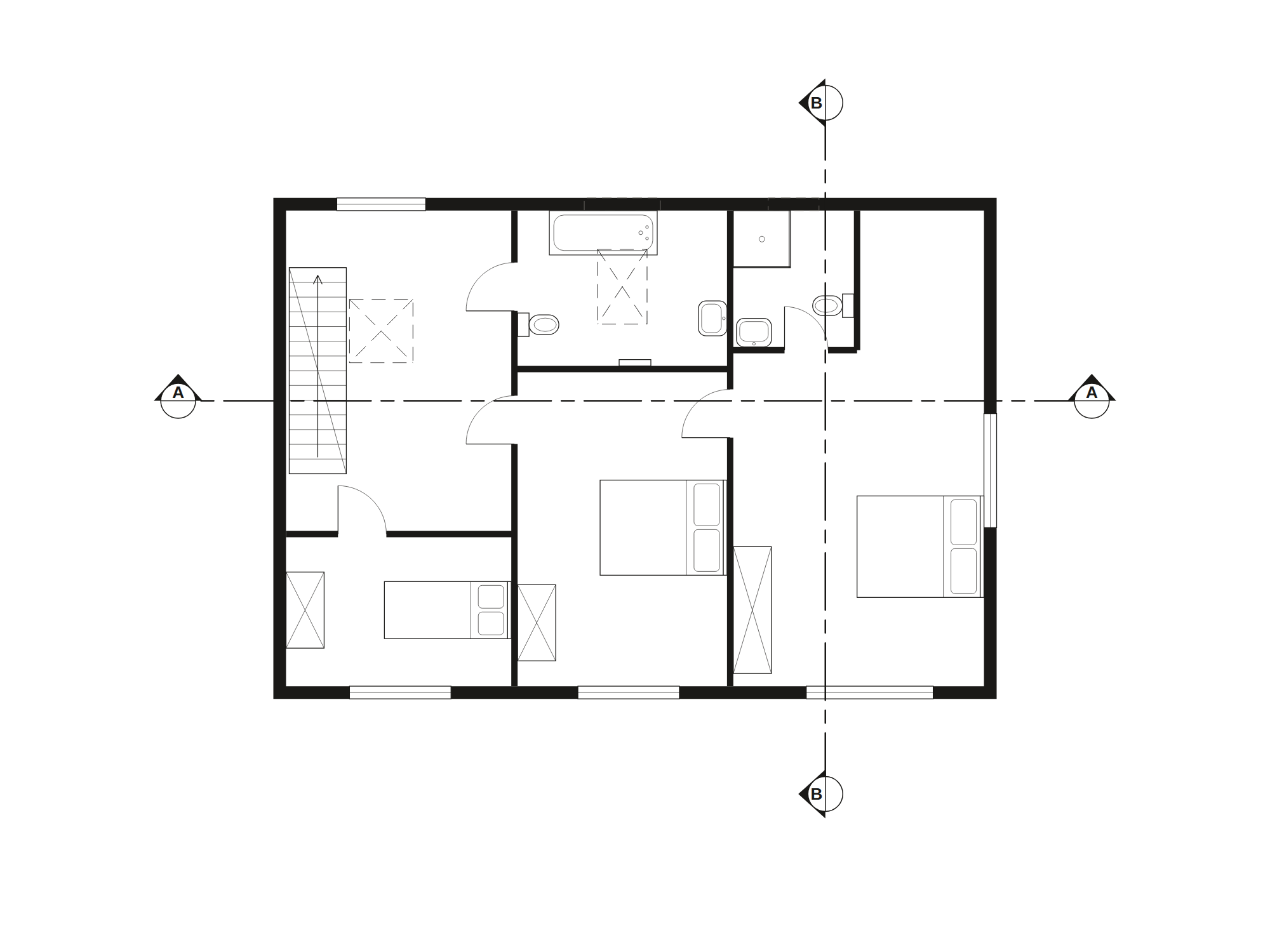 The first floor of the house at the top of this page: a second
document against the same datum. The stair arrives where the ground
floor's leaves, and the section you have already seen is cut through both
— joined by the engine and checked at the junction, never fitted.
The first floor of the house at the top of this page: a second
document against the same datum. The stair arrives where the ground
floor's leaves, and the section you have already seen is cut through both
— joined by the engine and checked at the junction, never fitted.
We wrote the alternative, and it was wrong three times
The case for this had to be tested rather than asserted, so the
competitor is a real file in the repository: a hand-written script that
draws the same house. It was written with the engine's source open — its
palette, its wall conventions, its house data — and corrected three times
against renders with a person reviewing. It is not a cold run, and we are
not going to present it as one.
Which makes the failures sharper rather than softer. Given every one of
those advantages, it was still wrong three times.
- The door's swing arc sprang from the hinge instead of the
leaf's tip, so it floated into the room ending nowhere near the jamb.
- Windows were bare white gaps — no frame, no glass line. A hole in a
wall, not a window.
- The internal walls had no doors in them at all.
Three rooms, no way into any of them.
Every version rendered cleanly. Two of the three faults were invisible at
the size the drawing was reviewed at, and the third survived two rounds of
review looking perfectly reasonable. An agent running unattended ships it.
Tokens are not the argument. On raw count, a script an
agent writes once still beats calling this, and the benchmark says so
plainly rather than burying it. The argument is that the cheap path's
failures are silent, plausible, and found by a human or not at all.
The cheap version is the wrong one, every time. We have not
measured tokens-to-completion for a cold agent — that needs a real run with
no sight of our source, and we have not done it. Nothing here is quoted as
though we had.
And then we ran it ourselves, and it was wrong too
One agent, one brief, this engine, in September 2026. It cost about
269,000 tokens and the drawings came out wrong: a section
facing the wrong way, a blank section B–B, a two-over-two sash that was
not one, 1:50 too small for the sheet, and eight dimension queries too small
to read.
Three things that run settled, and we would rather you heard them from
us:
- Looking is the job. About 100,000 of those tokens —
37% — were rendering a drawing and looking at it, roughly 8,000 a picture.
An agent writing its own SVG has the identical loop at the identical
price, so the biggest cost in the job is the same either way and cancels
out of the comparison entirely.
- Reading the engine cost ~65,000 tokens before any
work started. Over this MCP that cost is a tool list instead, which is the
honest argument for the server and one we had backwards.
- The refusals did their job. A spot level the schema
could not hold and two unused wall thicknesses were reported rather than
silently dropped. That is the part that worked.
We have not run the other side cold, so there is no A/B here and
we are not going to imply one.
When not to use it
If you want one sketch, once, and nobody is going to build from it, emit
the SVG yourself. It is free, it needs no key, and it will be fine. Reach
for this when the drawings have to agree with each other, when somebody is
going to measure one, when the set has to open in CAD, or when nobody is
going to be looking over the agent's shoulder.
Status
Free, and a demand probe rather than a product. It is
here to find out whether anyone wants it. It will be priced eventually and
there will be notice first. It is not promised free for ever, and it is not
for production you cannot afford to have change under you.
The engine's source is not public. This endpoint is the interface, not
the implementation.